 Claude Project Downloader
Free Chrome extension for Claude.ai
Download and back up your Claude projects and chats.
Every file, chat and artifact from your own account, in one click. Plus folders and search, right inside Claude.
4.8 · 5,000+ users · Featured on the Chrome Web Store
What it does
Everything Claude doesn't let you do with your work.
The whole project, one ZIP
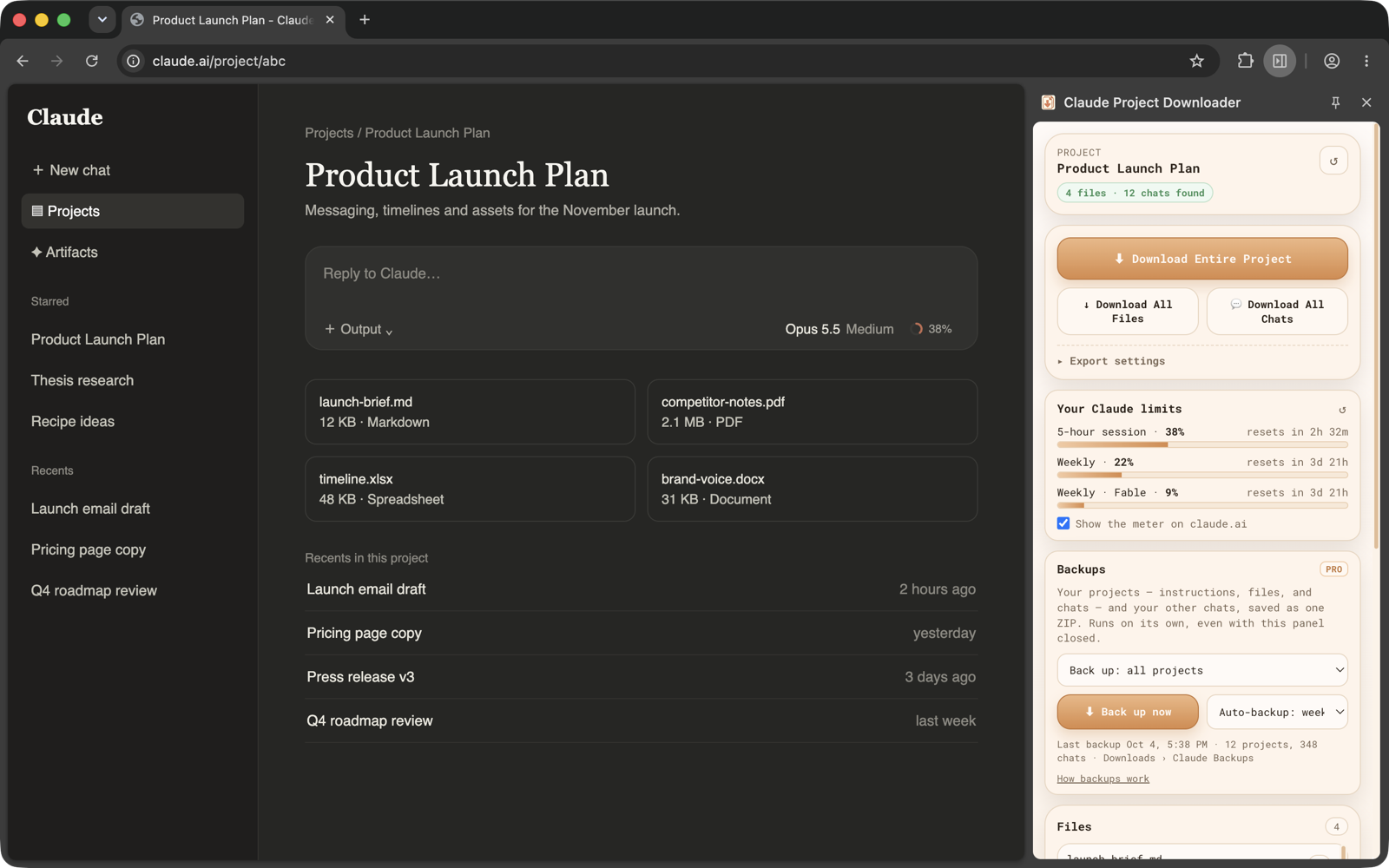
Every knowledge file, chat and artifact, organised into folders. Native formats or clean Markdown.
Any chat, saved properly
Markdown or JSON with attachments, from a Download button right next to Share.
Folders in Claude's sidebar
File chats and projects where you already work. Drag, drop, done.
Search every message
Not just titles. A private index built on your computer finds the exact line.
Automatic backups
Every project and chat, daily or weekly, even with Claude closed.
Your limits at a glance
Your 5-hour and weekly usage beside the model picker. Free for everyone.
Demo
See it in a minute.
How it works
Three steps. No setup.
- 1
Add it to Chrome
Free, no account. It uses the Claude login you already have.
- 2
Open a project or chat
On claude.ai, as usual. The side panel finds its files and chats.
- 3
Click Download
One ZIP for the whole project, or just the chats or files you pick.
Reviews
People keep their work with it.
4.8 / 5 on the Chrome Web Store“Fantastic extension that fulfils a very specific use case well. Plus, the customer service is great. Highly recommend getting the Pro version.”
 Nicholas S.Chrome Web Store review
“Moved a complicated claude.ai project to Claude Code, and this tool saved me a bunch of time, thanks!”
 Jeff W.Chrome Web Store review
“Served its purpose to extract from Claude projects — was worth the one-off payment.”
 Joe M.Chrome Web Store review
“I’m very appreciative of this tool. Thanks for developing it. I’m now a paid customer.”
 Matt R.Chrome Web Store review
“Just what I have been searching for! It’s weird that Claude doesn’t give a download button on their own.”
 Sujal M.Chrome Web Store review
“Thank you, thank you, thank you!!!”
 Libby F.Chrome Web Store review
“Fantastic. Thank you very much!!!”
 Kri S.Chrome Web Store review
“fireeee thank you!”
 Aditya R.Chrome Web Store review
Pricing
Free forever. Pro when you need more.
Free
$0
no account, no trial that ends
- 5 downloads a day, forever
- One full project export
- 3 folders, top 5 search results
- Live usage meter
Pro
$4.99/mo
or $34.99/yr, or $44.99 once
- Unlimited downloads and exports
- Unlimited folders, search and bulk actions
- Back up every project and chat
- Automatic daily or weekly backups
Cancel anytime · 7-day refund
Your work stays on your computer.
It runs in your browser with the Claude login you already have. No API key, no account, nothing uploaded, and no analytics in the extension. It only ever reads projects and chats your own account can open.
Guides
Exporting from Claude, explained.
How to export Claude chats
Anthropic's built-in export, single chats as Markdown or PDF, and chats with their attachments.
How to download all files from a Claude project
Every knowledge file as one ZIP, and which file types come back in their original format.
How to back up and export Claude projects
Export one project as files, what the official account export covers, and automatic local backups.
Free Claude export tools compared
Open-source exporters, userscripts and the official export, including when they are all you need.
How to download Claude artifacts
Claude's Export button, older artifacts, saving as PDF, and every artifact from a chat at once.
FAQ
Questions, answered.
Why doesn't the extension see my files?
Make sure you're on the Project page on claude.ai (not just a chat) and open the extension's side panel (click its icon) — it loads the project automatically. If it still doesn't see anything, reload the page and try again.
Is my project data sent anywhere?
No. The extension reads your project documents directly within your browser session and processes everything locally. No external servers are used to access your files.
Does this require my Claude API key?
No API key is needed. The extension uses your existing claude.ai login session to access files you already have permission to view.
Can I export my chats too?
Yes. Open any conversation and use the Download button the extension adds next to Share to save it as a Markdown or JSON transcript, attachments included. "Download All Chats" and "Download Entire Project" in the side panel export every conversation in the project at once.
How do folders work?
A Folders section appears in claude.ai's sidebar, above Recents. File the chat or project you have open with one click, or open the Library tab in the extension's side panel and drag chats onto a folder — or select dozens and file them at once. Folders are kept on your computer only; free includes 3, Pro has no limit.
Can I search inside my Claude chats?
Yes. The Library builds a private search index of your own chats on your computer, keeps it current, and matches what was said, not just titles. Every word must match; put a phrase in "quotes" to match it exactly. Free shows the top 5 results; Pro shows them all.
Can I delete or move chats in bulk?
Yes. In the Library, select chats (shift-click for a range) and move them into a Claude project, export them as one Markdown ZIP, or delete them. A delete always asks first and tells you how many chats it will remove — deleted chats can't be restored. Free covers 5 chats per action; Pro has no limit.
What happens after my 5 free downloads?
You can keep using the extension the next day — the free limit resets daily, forever. If you would rather not wait, Pro switches on unlimited downloads for good.
Do I have to pay for this?
No. The extension is free and stays free: 5 downloads a day plus one full project export, with no account needed and no trial that expires. Pro is optional — it unlocks unlimited downloads and exports, unlimited folders, every search result, unlimited bulk actions, full-account backups and automatic backups. It's $4.99 a month or $34.99 a year (cancel anytime), or $44.99 once for lifetime access; checkout runs through Freemius. Anyone who already bought the $4.99 lifetime licence keeps it forever.
Can I export spreadsheets or .xlsx files?
Claude doesn't expose a direct download endpoint for spreadsheets. The extension generates a ready-to-paste prompt that asks Claude to give you the content in chat instead.
Where is my key?
Freemius emails your key as soon as the payment completes, and shows it on the confirmation page. Paste it into the extension's side panel under "Enter your license key" at the bottom, or on the extension's welcome page to switch Pro on in any of your own browsers.
Can I get my money back?
Yes — if you change your mind or the extension doesn't work for you, contact support within 7 days of paying and we'll refund it, no questions asked.
Full details: what it exports, permissions, limits
Claude.ai has no way to get a Project back out as files. There's no download button for the knowledge-base files and none for a single conversation, only an account-wide data export that arrives by email as raw JSON. If you've spent hours uploading research into a Project and weeks talking to Claude inside it, you want it back as normal files. Claude Project Downloader does that. It reads the project you already have open in your own signed-in Claude session and saves it to your computer.
Download every file as a single ZIP archive, or pick individual files one at a time. Keep the original format — Markdown, PDF, DOCX, TXT, and images — or convert everything to clean Markdown automatically. Export any conversation as a Markdown or JSON transcript, attachments included, from a Download button the extension adds next to Share. Or grab the entire project — chats, files, and artifacts — in one organised archive.
Once your chats are out, the Library keeps them in order. A Folders section sits right in claude.ai's sidebar, above Recents: file the open chat or project with one click, or drag chats onto folders in the Library. Search reads inside every message, not just titles, from a private index built on your computer, and shows the line that matched. Select many chats at once to move them into a Claude project, export them as one ZIP, or delete them after a clear confirmation.
The extension is free — 5 downloads a day, one full project export, 3 folders, the top 5 search results and 5 chats per bulk action, with no account or sign-up required, and it stays that way. Pro — $4.99 a month, $34.99 a year, or $44.99 once for lifetime access — removes every one of those limits and adds one-click and automatic daily or weekly backups of every project and chat in your account. Everyone gets a live Claude usage meter, including how much context the open chat re-sends with each message. Everything happens locally in your browser using your existing Claude.ai session: no credentials are stored, no project data, folders or search index is uploaded anywhere, and the extension runs no analytics.
Every feature
- One-click export of every file in a Claude project's knowledge base
- Bulk ZIP download — every project file packaged into a single archive
- Individual file downloads — grab just the documents you need
- Chat transcript export — any conversation as Markdown or JSON, attachments included
- Artifacts and sandbox files Claude created for you, exported alongside the chat
- Whole-project export — chats, files, and artifacts in one organised ZIP
- Keep native formats (Markdown, PDF, DOCX, TXT, images) or convert everything to Markdown
- Image downloads supported, saved in Claude's WebP preview format
- Smart fallback prompt for unsupported formats like spreadsheets — paste it into Claude to get the content in chat
- 5 free downloads per day, forever — no account or sign-up required
- One free full project export to try — every chat and file in one click
- Pro: unlimited downloads and full project exports
- Pro: back up every project and every chat in your account in one ZIP
- Pro: automatic daily or weekly backups — no Claude tab needs to be open
- Folders for Claude chats — a Folders section in claude.ai’s sidebar, above Recents
- Search inside every message, from a private index built on your computer; put a phrase in "quotes" to match it exactly
- Bulk actions — select many chats and move them to a project, export them as one ZIP, or delete them after a confirmation
- Free: 3 folders, the top 5 search results and 5 chats per bulk action. Pro: no limits
- Free live Claude usage meter beside the model picker — your 5-hour and weekly limits at a glance
- See how much context the open chat re-sends with each message, so you know when to start a fresh one
- Uses your existing Claude.ai session — no extra login or API key
- 100% local processing — no project data, folders or search index ever leaves your browser
- No analytics or tracking inside the extension
- All future updates included, free or Pro
Works with
Chrome on Windows, macOS, Linux. Exports: Claude.ai project knowledge base files; Conversations — as Markdown or JSON transcripts, with attachments; Artifacts and sandbox files Claude created; Markdown, HTML, and plain text documents; PDF documents; Images (downloaded as WebP); Word documents (exported as extracted text). Not supported: Spreadsheets (.xlsx / .csv); Firefox, Edge, Safari, and mobile browsers; Projects your Claude account can’t open.
Limitations
- Spreadsheets (.xlsx, .csv) cannot be exported directly — use the built-in fallback prompt instead.
- You must have the Claude project page open and active for the extension to detect its files.
- Currently available for Chrome only — Firefox, Edge, and Safari are not supported.
- The free tier allows 5 downloads per day, one full project export, 3 folders, the top 5 search results and 5 chats per bulk action; Pro removes all of them.
- Folders and the search index are stored in the browser you made them in — they don’t sync between computers.
Permissions, and why
activeTabLets the extension read the list of files in the Claude project you have open when you click the toolbar icon.downloadsUsed to save the exported ZIP archive and individual files to your Downloads folder.storageStores your licence key, your Pro status, the free-tier counters, and your folders locally on your device.scriptingRe-injects the extension's own content script into an already-open Claude tab after an update, so you don't have to refresh the page by hand, and runs the bulk Move and Delete you choose inside that tab. Only ever used on claude.ai.sidePanelThe export screen and the Library live in Chrome’s side panel, so they stay open during long exports.alarmsRuns the backups you schedule and a once-a-day licence re-check.offscreenBuilds a backup ZIP in the background so it keeps running with the panel closed.host_permissions (claude.ai)Limits access to claude.ai so the extension can only read project document data from your active session — nothing else.
Get your Claude work out, today.
Free to start. Takes ten seconds.
Add to Chrome, it's free